
Adding and splitting sectors#
This notebook uses the packaged MARIO IOT test table to show the Excel workflow for extending a database with new sectors.
The screenshots below refer to the IOT workbook. SUT follows the same workflow, but the Master sheet uses Activity and Commodity, includes Market share, and does not expose Add or Split.
The Split workflow is for the moment supported only for the IOT case and relies on a cross-minimum entropy optimization model written in the CVXlab framework and embedded into MARIO. A publications on this model will be soon sent to peer review.
The overall logic of the algorithm is depicted in the figure below, while a complete example of the add-sector workflow (including split=True) is available at the following repository.
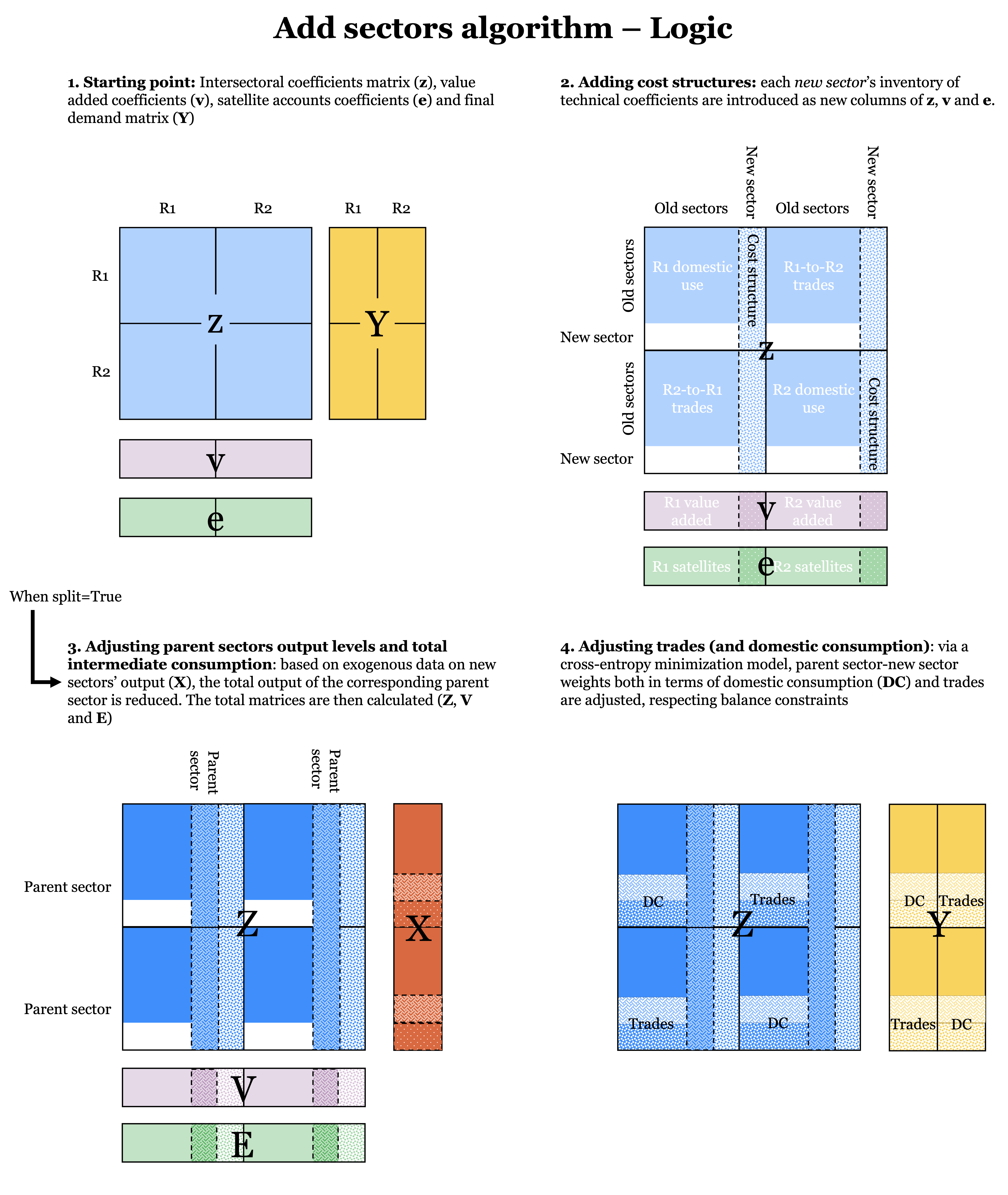
N.B. the implemented model relies on a non-linear formulation and for large models, the MOSEK solver may represent the best solution. In that case, follow instructions on how to get a MOSEK license and be sure you install MOSEK via pip in your environment. Consider also that the splitting algorithm is still under development.
Load an IOT table#
We start from a simplified IOT table, downloadable here.
[ ]:
import mario
db = mario.parse_from_excel(
    path = "path/to/source IOT workbook.xlsx",
    table = "IOT",
    mode = "flows"
    )
db.get_index("Sector")
INFO Parser: excel reading IOT flows from /Users/lorenzorinaldi/Documents/GitHub/MARIO/mario/test/supporting_files/add_sectors/add_sector_iot_table.xlsx.
INFO Parser: state payload ready with 6 canonical blocks.
INFO Parser: excel state ready for IOT.
INFO Metadata: initialized.
['s1', 's2', 's3', 's4']
Generate an empty add-sector template#
The add-sectors workbook is usually filled in two passes:
generate the empty workbook;
fill the
Mastersheet;let MARIO create the missing inventory sheets;
fill the inventory sheets in Excel;
read the completed workbook and apply it.
The next sections explain what each sheet is for before running the workflow.
Download the packaged example workbooks#
The exact files used in this example are available here:
[ ]:
db.get_add_sectors_excel(
    path="path/where/to/download/empty add-sector template.xlsx",
    overwrite=True,
)
The Master sheet#
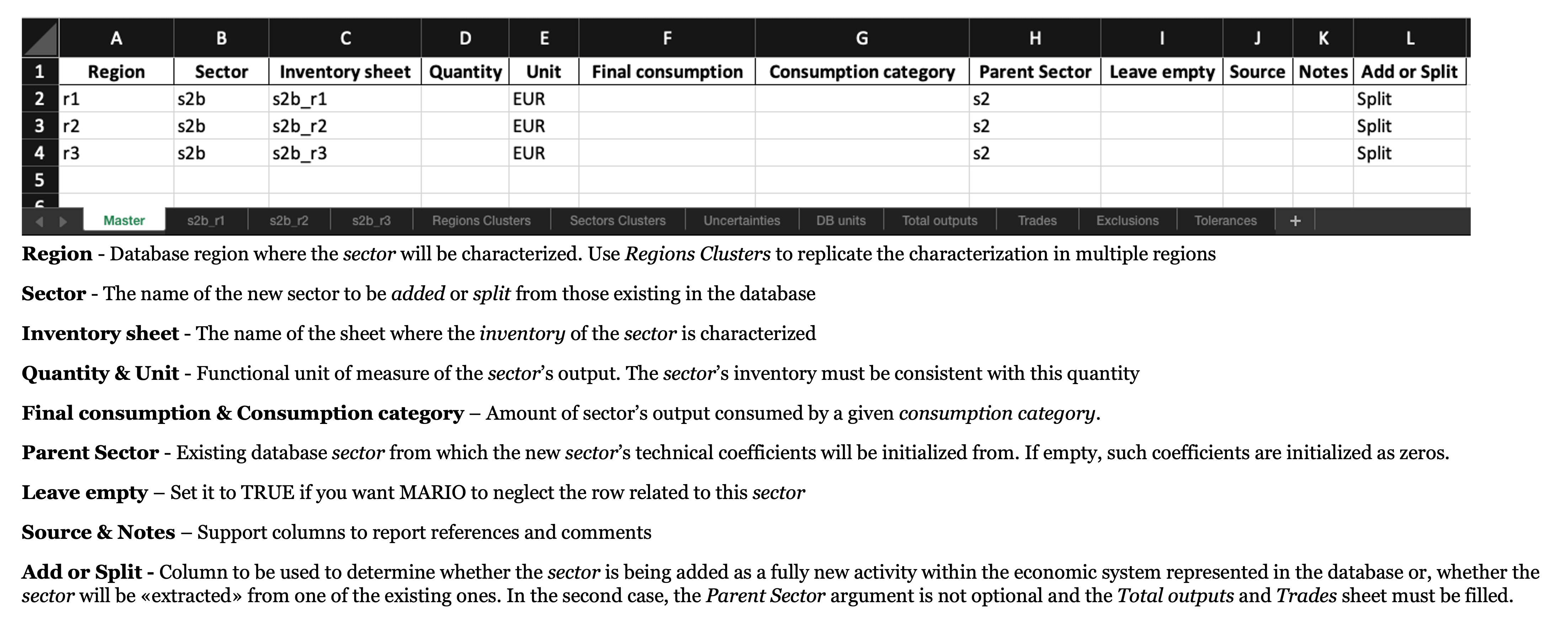
The Master sheet defines the high-level structure of the extension:
Region: target database region. You can also use a region cluster name to replicate the same characterization in multiple regions.Sector: name of the new sector.Inventory sheet: name of the sheet where the inventory is described.QuantityandUnit: functional unit of the new sector’s output.Final consumptionandConsumption category: optional final demand attached to the new sector.Parent Sector: existing sector used as the reference when coefficients or percentage changes should inherit an existing structure.Leave empty: when set toTRUE, MARIO skips that inventory sheet.Add or Split: useAddfor a fully new sector, orSplitwhen the new sector must be extracted from a parent sector.
The same inventory sheet name can be reused across multiple Master rows when one characterization should be applied to multiple target regions.
The Clusters sheets#
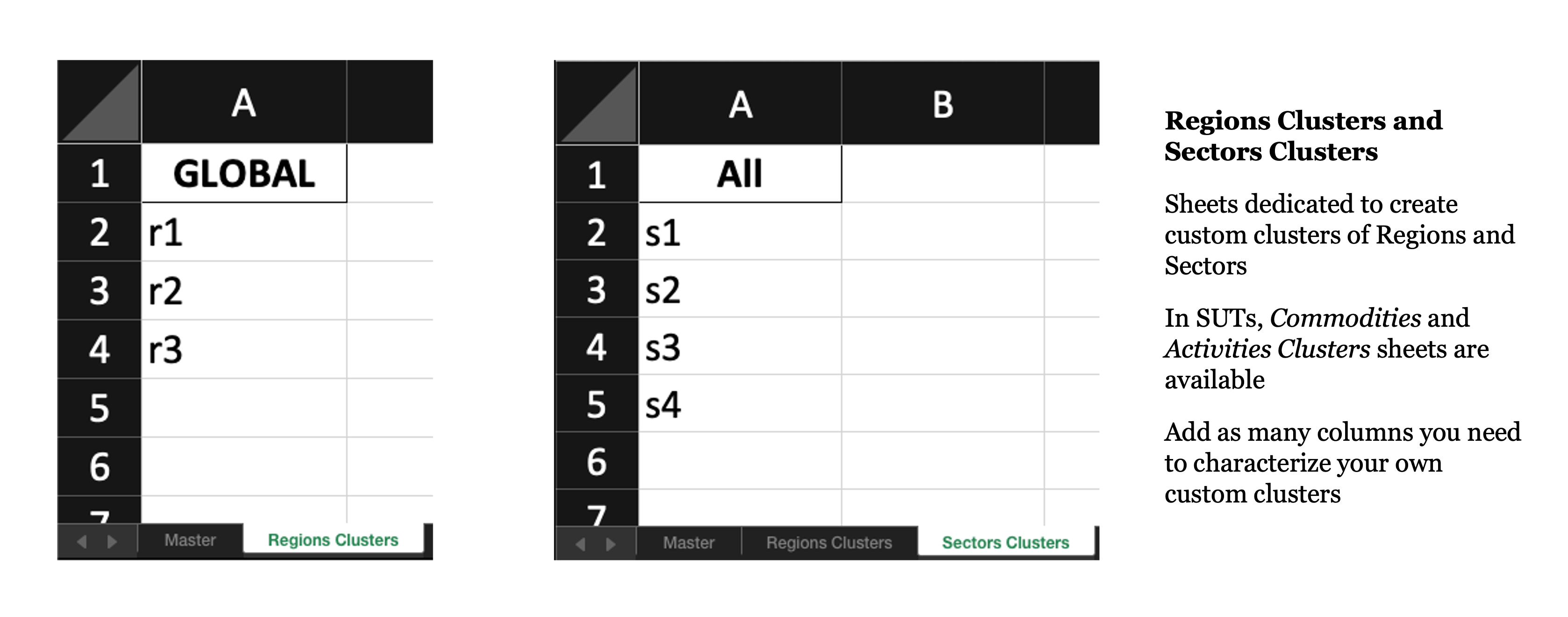
Cluster sheets are optional, but they are useful whenever the same assumptions must be repeated:
Regions Clusters: each column header is one cluster name, and each non-empty cell below it is one database region included in that cluster.Sectors Clusters: in IOT, this lets you group multiple existing sectors under one reusable label.Commodities Clusters: in SUT, the item-cluster sheet works in the same way for commodity inputs.
Region clusters can be referenced in Master.Region and in Inventory.DB Region. Item clusters can be referenced in Inventory.DB Item.
Create inventory sheets from a filled Master sheet#
Fill the Master sheet in Excel first. Once the rows and inventory-sheet names are ready, read the workbook back with get_inventories=True so MARIO creates the missing inventory tabs inside the same file.
[ ]:
db.read_add_sectors_excel(
    path="path/to/filled master workbook.xlsx",
    get_inventories=True,
)
The inventory sheets#
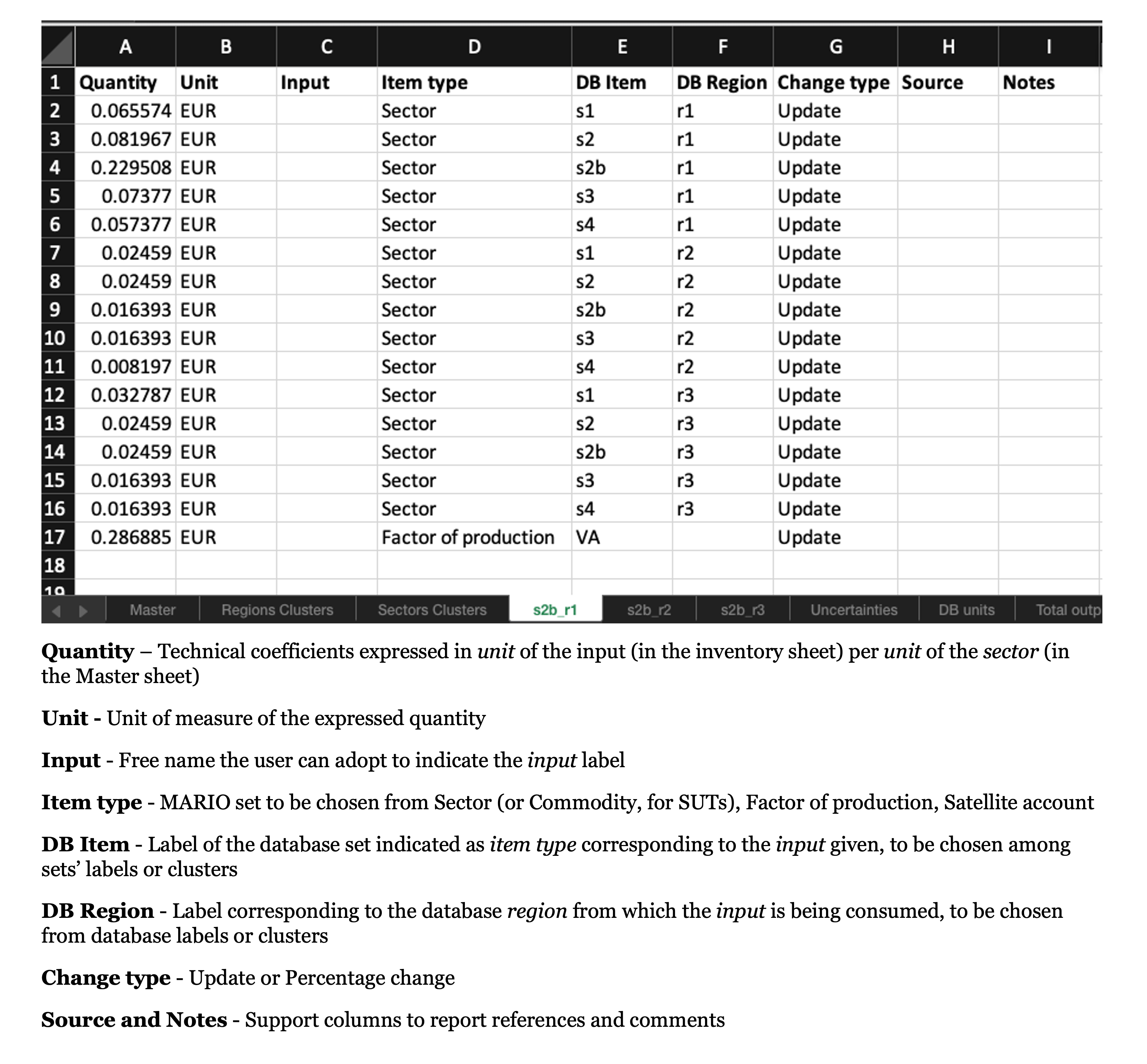
Each inventory sheet describes the inputs used by the new sector:
Quantity: technical coefficient per unit of output declared inMaster.Unit: unit of that coefficient.Input: free user label; MARIO does not use it as a database key.Item type: database set to target, such asSector,Factor of production, orSatellite account.DB Item: existing database label, or an item-cluster name when clusters are used.DB Region: source region of the input. This can be a database region or a region cluster.Change type: useUpdatefor an absolute coefficient, orPercentageto scale the parent structure.SourceandNotes: support columns for references and comments.
The DB units sheet in the workbook is a reference tab that helps you keep units consistent with the database.
Split-specific sheets#
If at least one row in Master is marked as Split, MARIO also relies on Total outputs, Trades, (both mandatory) Exclusions (optional), and Tolerances (mandatory but prefilled). For the moment, this is an IOT-only workflow. In practice, Split means that the new sector is extracted from an existing parent sector rather than added as a completely independent structure.
The Total outputs sheet#
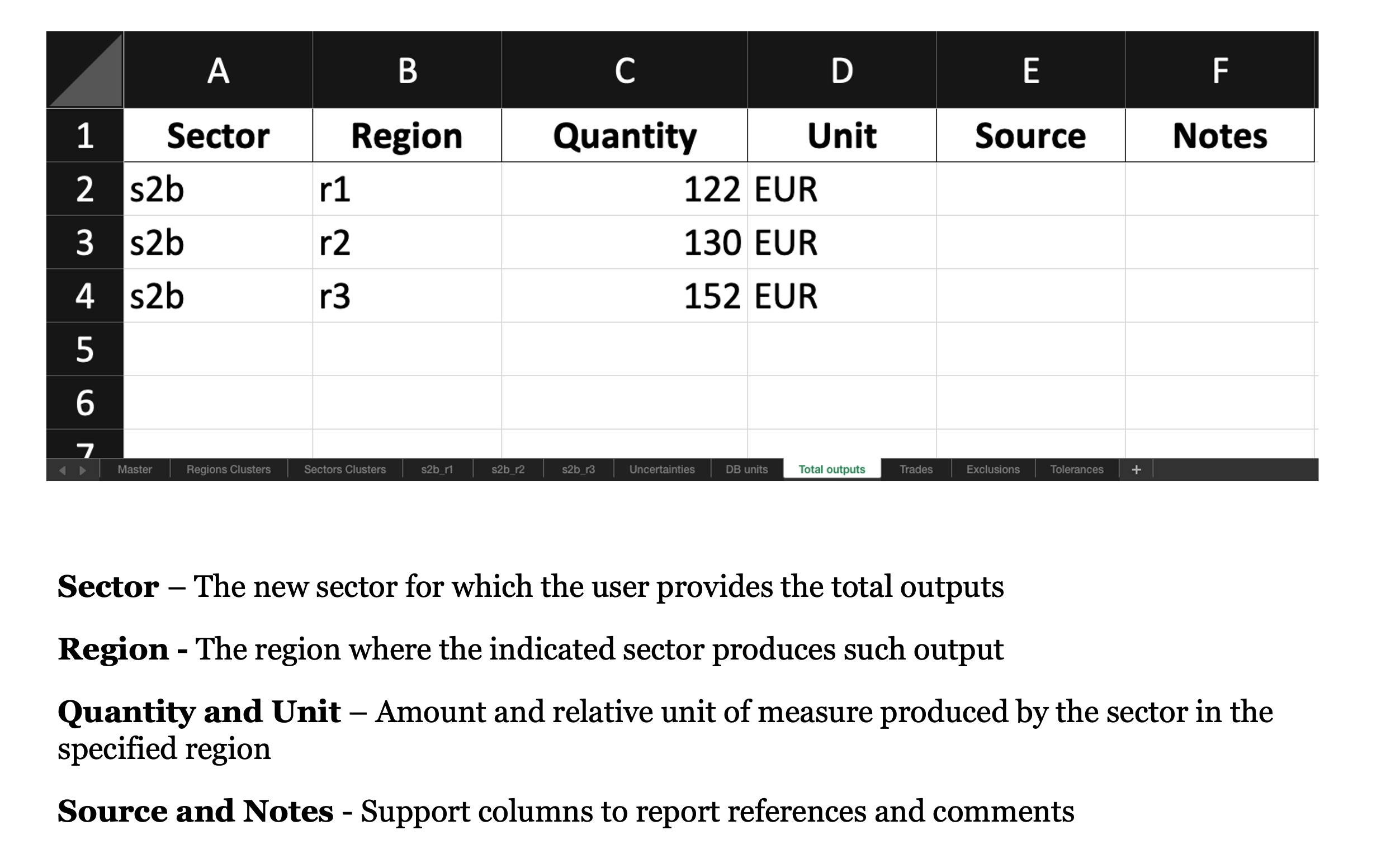
For each new sector, the user must specify the production level in each region of the database
The Trades sheet#
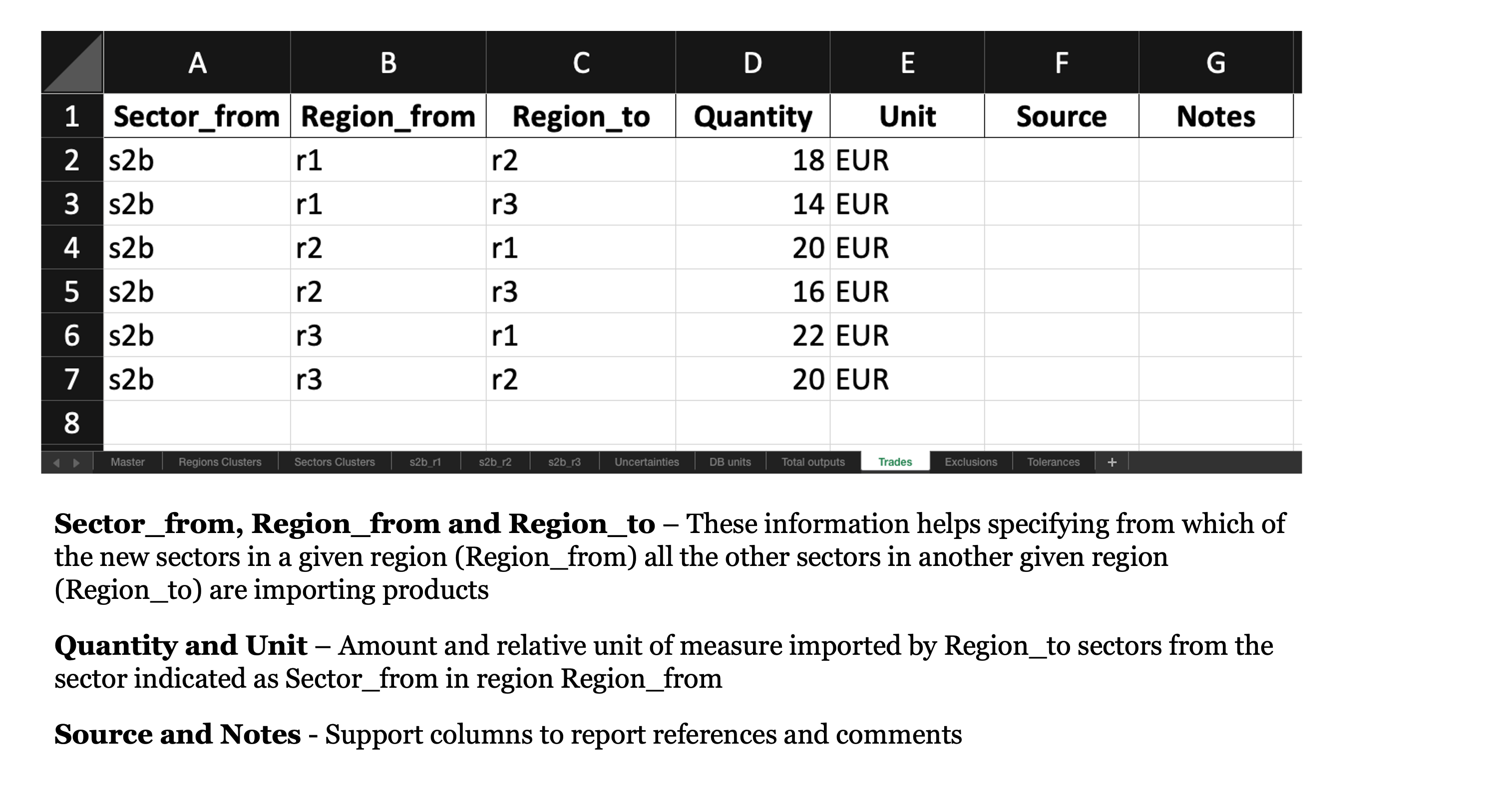
For each new sector in each region, the user must specify the amount of product imported by the other regions
The Exclusion sheet#
Here you can specify whether some of those sectors indicated as Sector_to do not consume any input coming from Sector_from. In our simplified example, we did not implement any exclusion
The Tolerances sheet#
Here you can modify the rigidity of the optimization problem by acting on the delta and eps parameters.
Read the completed workbook#
After filling the generated inventory tabs and, if necessary, the split-specific data sheets, read the completed workbook with read_inventories=True. MARIO will normalize the Master sheet, load clusters, and group the inventories by target sector.
[11]:
db.read_add_sectors_excel(
    path="path/to/completed inventories workbook.xlsx",
    read_inventories=True,
)

db.inventories['s2b']['s2b_r1'] # or any other inventory you input
[11]:
| Quantity | Unit | Input | Item type | DB Item | DB Region | Change type | Source | Notes | |
|---|---|---|---|---|---|---|---|---|---|
| 0 | 0.065574 | EUR | None | Sector | s1 | r1 | Update | None | None |
| 1 | 0.081967 | EUR | None | Sector | s2 | r1 | Update | None | None |
| 2 | 0.229508 | EUR | None | Sector | s2b | r1 | Update | None | None |
| 3 | 0.073770 | EUR | None | Sector | s3 | r1 | Update | None | None |
| 4 | 0.057377 | EUR | None | Sector | s4 | r1 | Update | None | None |
| 5 | 0.024590 | EUR | None | Sector | s1 | r2 | Update | None | None |
| 6 | 0.024590 | EUR | None | Sector | s2 | r2 | Update | None | None |
| 7 | 0.016393 | EUR | None | Sector | s2b | r2 | Update | None | None |
| 8 | 0.016393 | EUR | None | Sector | s3 | r2 | Update | None | None |
| 9 | 0.008197 | EUR | None | Sector | s4 | r2 | Update | None | None |
| 10 | 0.032787 | EUR | None | Sector | s1 | r3 | Update | None | None |
| 11 | 0.024590 | EUR | None | Sector | s2 | r3 | Update | None | None |
| 12 | 0.024590 | EUR | None | Sector | s2b | r3 | Update | None | None |
| 13 | 0.016393 | EUR | None | Sector | s3 | r3 | Update | None | None |
| 14 | 0.016393 | EUR | None | Sector | s4 | r3 | Update | None | None |
| 15 | 0.286885 | EUR | None | Factor of production | VA | NaN | Update | None | None |
Apply the completed workbook#
Once the inventories are loaded, db.add_sectors(...) inserts the new sectors into the database.
[12]:
expanded_db = db.add_sectors(inplace=False)
expanded_db.get_index("Sector")
WARNING Database: All scenarios will be deleted from the database after add_sectors.
INFO Resolver: resolving z for baseline.
INFO Resolver: trying z via formula build_iot_z_from_Z_X.
INFO Resolver: resolved z via formula build_iot_z_from_Z_X.
INFO Resolver: resolving e for baseline.
INFO Resolver: trying e via formula build_iot_e_from_E_X.
INFO Resolver: resolved e via formula build_iot_e_from_E_X.
INFO Resolver: resolving v for baseline.
INFO Resolver: trying v via formula build_iot_v_from_V_X.
INFO Resolver: resolved v via formula build_iot_v_from_V_X.
INFO New Sector: ['s2b'] added to the database
[12]:
['s1', 's2', 's2b', 's3', 's4']
The updated coefficient and final-demand blocks now contain the new sectors.
[13]:
expanded_db.z
[13]:
| Region | r1 | r2 | r3 | ||||||||||||||
|---|---|---|---|---|---|---|---|---|---|---|---|---|---|---|---|---|---|
| Level | Sector | Sector | Sector | ||||||||||||||
| Item | s1 | s2 | s2b | s3 | s4 | s1 | s2 | s2b | s3 | s4 | s1 | s2 | s2b | s3 | s4 | ||
| Region | Level | Item | |||||||||||||||
| r1 | Sector | s1 | 0.217391 | 0.068182 | 0.065574 | 0.054054 | 0.051546 | 0.027211 | 0.017921 | 0.015385 | 0.017241 | 0.009615 | 0.017341 | 0.012422 | 0.013158 | 0.007463 | 0.008333 |
| s2 | 0.115942 | 0.310606 | 0.081967 | 0.144144 | 0.134021 | 0.034014 | 0.032258 | 0.015385 | 0.025862 | 0.019231 | 0.023121 | 0.018634 | 0.013158 | 0.014925 | 0.016667 | ||
| s2b | 0.000000 | 0.000000 | 0.229508 | 0.000000 | 0.000000 | 0.000000 | 0.000000 | 0.015385 | 0.000000 | 0.000000 | 0.000000 | 0.000000 | 0.006579 | 0.000000 | 0.000000 | ||
| s3 | 0.043478 | 0.060606 | 0.073770 | 0.225225 | 0.082474 | 0.013605 | 0.010753 | 0.007692 | 0.008621 | 0.009615 | 0.005780 | 0.006211 | 0.006579 | 0.007463 | 0.008333 | ||
| s4 | 0.036232 | 0.049242 | 0.057377 | 0.072072 | 0.226804 | 0.006803 | 0.007168 | 0.007692 | 0.008621 | 0.009615 | 0.005780 | 0.006211 | 0.006579 | 0.007463 | 0.008333 | ||
| r2 | Sector | s1 | 0.036232 | 0.026515 | 0.024590 | 0.018018 | 0.020619 | 0.190476 | 0.057348 | 0.053846 | 0.051724 | 0.048077 | 0.017341 | 0.012422 | 0.013158 | 0.007463 | 0.008333 |
| s2 | 0.050725 | 0.041667 | 0.024590 | 0.036036 | 0.030928 | 0.095238 | 0.275986 | 0.069231 | 0.129310 | 0.125000 | 0.023121 | 0.018634 | 0.013158 | 0.014925 | 0.016667 | ||
| s2b | 0.000000 | 0.000000 | 0.016393 | 0.000000 | 0.000000 | 0.000000 | 0.000000 | 0.207692 | 0.000000 | 0.000000 | 0.000000 | 0.000000 | 0.006579 | 0.000000 | 0.000000 | ||
| s3 | 0.014493 | 0.015152 | 0.016393 | 0.009009 | 0.010309 | 0.034014 | 0.053763 | 0.061538 | 0.206897 | 0.067308 | 0.005780 | 0.006211 | 0.006579 | 0.007463 | 0.008333 | ||
| s4 | 0.014493 | 0.011364 | 0.008197 | 0.009009 | 0.010309 | 0.027211 | 0.046595 | 0.053846 | 0.060345 | 0.201923 | 0.005780 | 0.006211 | 0.006579 | 0.007463 | 0.008333 | ||
| r3 | Sector | s1 | 0.043478 | 0.034091 | 0.032787 | 0.027027 | 0.020619 | 0.034014 | 0.025090 | 0.023077 | 0.017241 | 0.019231 | 0.184971 | 0.062112 | 0.059211 | 0.052239 | 0.050000 |
| s2 | 0.065217 | 0.049242 | 0.024590 | 0.045045 | 0.041237 | 0.047619 | 0.039427 | 0.023077 | 0.034483 | 0.028846 | 0.104046 | 0.270186 | 0.072368 | 0.126866 | 0.125000 | ||
| s2b | 0.000000 | 0.000000 | 0.024590 | 0.000000 | 0.000000 | 0.000000 | 0.000000 | 0.015385 | 0.000000 | 0.000000 | 0.000000 | 0.000000 | 0.197368 | 0.000000 | 0.000000 | ||
| s3 | 0.021739 | 0.018939 | 0.016393 | 0.018018 | 0.010309 | 0.013605 | 0.014337 | 0.015385 | 0.008621 | 0.009615 | 0.040462 | 0.052795 | 0.059211 | 0.194030 | 0.066667 | ||
| s4 | 0.014493 | 0.015152 | 0.016393 | 0.009009 | 0.010309 | 0.013605 | 0.010753 | 0.007692 | 0.008621 | 0.009615 | 0.034682 | 0.046584 | 0.052632 | 0.059701 | 0.191667 | ||
[14]:
expanded_db.Y
[14]:
| Region | r1 | r2 | r3 | ||
|---|---|---|---|---|---|
| Level | Consumption category | Consumption category | Consumption category | ||
| Item | CC | CC | CC | ||
| Region | Level | Item | |||
| r1 | Sector | s1 | 40.0 | 10.0 | 8.0 |
| s2 | 65.0 | 22.0 | 17.0 | ||
| s2b | 0.0 | 0.0 | 0.0 | ||
| s3 | 28.0 | 9.0 | 7.0 | ||
| s4 | 25.0 | 8.0 | 6.0 | ||
| r2 | Sector | s1 | 12.0 | 45.0 | 10.0 |
| s2 | 19.0 | 80.0 | 22.0 | ||
| s2b | 0.0 | 0.0 | 0.0 | ||
| s3 | 8.0 | 35.0 | 9.0 | ||
| s4 | 7.0 | 32.0 | 8.0 | ||
| r3 | Sector | s1 | 10.0 | 12.0 | 50.0 |
| s2 | 17.0 | 19.0 | 93.0 | ||
| s2b | 0.0 | 0.0 | 0.0 | ||
| s3 | 7.0 | 8.0 | 42.0 | ||
| s4 | 6.0 | 7.0 | 40.0 |
Disaggregate a new sector from an existing one (with CVXLab)#
By “splitting”, we mean “disaggregating a new sector from an existing one”. This workflow is for IOT only and is supported by a CVXlab model.
Download the bundled split-model assets#
For transparency, the exact CVXLab assets used by this workflow are available here:
[15]:
expanded_db_split = db.add_sectors(
    inplace=False,
    split=True,
    cvxlab_path="path/where/to/store/cvxlab/model/files",
)
WARNING Database: All scenarios will be deleted from the database after add_sectors.
INFO Resolver: resolving z for baseline.
INFO Resolver: trying z via formula build_iot_z_from_Z_X.
INFO Resolver: resolved z via formula build_iot_z_from_Z_X.
INFO Resolver: resolving e for baseline.
INFO Resolver: trying e via formula build_iot_e_from_E_X.
INFO Resolver: resolved e via formula build_iot_e_from_E_X.
INFO Resolver: resolving v for baseline.
INFO Resolver: trying v via formula build_iot_v_from_V_X.
INFO Resolver: resolved v via formula build_iot_v_from_V_X.
INFO New Sector: ['s2b'] added to the database
INFO Split scenario 'split_baseline' generated for sectors ['s2b'].
INFO | Model | Model instance generation...
INFO | Model | Custom 'operators' import | Imported 2 custom function(s) from 'user_defined_operators.py'.
INFO | Model | Custom 'operators' import | Imported 2 custom function(s) from 'user_defined_operators.py'.
INFO | Model | Custom 'constants' import | Imported 4 custom function(s) from 'user_defined_constants.py'.
INFO | Model | Custom 'constants' import | Imported 4 custom function(s) from 'user_defined_constants.py'.
INFO | Model | Custom 'constants' import | Imported 4 custom function(s) from 'user_defined_constants.py'.
INFO | Model | Custom 'constants' import | Imported 4 custom function(s) from 'user_defined_constants.py'.
INFO | Model.core.database | Generating new sets excel file 'sets.xlsx'.
INFO | Model | Model instance generation... DONE (0.06 seconds)
INFO | Model | Loading sets and variables coordinates...
INFO | Model | Loading sets and variables coordinates... DONE (0.02 seconds)
INFO | Model | Generation of blank data structures...
INFO | Model | Creating new blank SQLite database 'database.db'.
INFO | Model | Generating new blank input data directory and related file/s.
INFO | Model | Generation of blank data structures... DONE (0.36 seconds)
INFO | Model | Loading input data to SQLite database...
INFO | Model | Loading input data to SQLite database... DONE (0.13 seconds)
INFO | Model | Numerical model generation...
INFO | Model.core | Loading and validating symbolic problem...
INFO | Model.core | Loading and validating symbolic problem... DONE (0.02 seconds)
INFO | Model.core | Checking exogenous data coherence...
INFO | Model.core | Checking exogenous data coherence... DONE (0.00 seconds)
INFO | Model.core | Generating data structures for endogenous data tables...
INFO | Model.core | Generating data structures for endogenous data tables... DONE (0.02 seconds)
INFO | Model.core | Generating data structures for all variables and constants...
INFO | Model.core | Generating data structures for all variables and constants... DONE (0.20 seconds)
INFO | Model.core | Fetching data from 'database.db' to cvxpy exogenous variables...
INFO | Model.core | Fetching data from 'database.db' to cvxpy exogenous variables... DONE (0.19 seconds)
INFO | Model.core.problem | Generating cvxpy numerical problem/s...
INFO | Model.core.problem | Generating cvxpy numerical problem/s... DONE (0.05 seconds)
INFO | Model | Numerical model generation... DONE (0.49 seconds)
INFO | Model | Model run | Solution mode: independent' | Solver: 'SCS' | Problems: 1 | Scenarios: 1
INFO | Model | Solving numerical problems...
INFO | Model.core.problem | Solving cvxpy sub-problem 'nan'
INFO | Model.core.problem | Problem status: 'optimal_inaccurate'
INFO | Model | Solving numerical problems... DONE (4.01 seconds)
INFO | Model | =================================
INFO | Model | Numerical problems status report:
INFO | Model | Sub-problem [nan]: optimal_inaccurate
INFO | Model | Exporting endogenous model results to SQLite database...
INFO | Model | Exporting endogenous model results to SQLite database... DONE (0.04 seconds)
[16]:
expanded_db_split.Z
[16]:
| Region | r1 | r2 | r3 | ||||||||||||||
|---|---|---|---|---|---|---|---|---|---|---|---|---|---|---|---|---|---|
| Level | Sector | Sector | Sector | ||||||||||||||
| Item | s1 | s2 | s2b | s3 | s4 | s1 | s2 | s2b | s3 | s4 | s1 | s2 | s2b | s3 | s4 | ||
| Region | Level | Item | |||||||||||||||
| r1 | Sector | s1 | 30.000000 | 7.771668 | 10.228326 | 6.000000 | 5.000000 | 4.000000 | 2.465351 | 2.534586 | 2.000000 | 1.000000 | 3.000000 | 1.616242 | 2.383706 | 1.000000 | 1.000000 |
| s2 | 8.509342 | 34.310533 | 6.052092 | 8.509342 | 6.709267 | 2.504708 | 3.821973 | 1.134627 | 1.436139 | 1.397857 | 1.756019 | 2.454768 | 1.085127 | 1.074038 | 1.074038 | ||
| s2b | 7.490658 | 24.691524 | 16.945851 | 7.490658 | 6.290603 | 2.495292 | 2.908773 | 1.134627 | 1.563861 | 0.602143 | 2.243981 | 1.917541 | 0.542564 | 0.925962 | 0.925962 | ||
| s3 | 6.000000 | 5.136160 | 10.863834 | 25.000000 | 8.000000 | 2.000000 | 1.693869 | 1.306088 | 1.000000 | 1.000000 | 1.000000 | 0.808117 | 1.191851 | 1.000000 | 1.000000 | ||
| s4 | 5.000000 | 4.453046 | 8.546813 | 8.000000 | 22.000000 | 1.000000 | 0.786730 | 1.213238 | 1.000000 | 1.000000 | 1.000000 | 0.808117 | 1.191851 | 1.000000 | 1.000000 | ||
| r2 | Sector | s1 | 5.000000 | 3.133566 | 3.866353 | 2.000000 | 2.000000 | 28.000000 | 7.274624 | 8.725369 | 6.000000 | 5.000000 | 3.000000 | 1.616242 | 2.383706 | 1.000000 | 1.000000 |
| s2 | 3.645617 | 4.229987 | 1.815629 | 1.845619 | 1.617539 | 6.949532 | 32.495614 | 5.105818 | 7.549525 | 6.349539 | 1.737605 | 2.486847 | 1.085127 | 1.076414 | 1.076414 | ||
| s2b | 3.354383 | 3.743964 | 1.210420 | 2.154381 | 1.382461 | 7.050328 | 24.081120 | 15.317448 | 7.450325 | 6.650331 | 2.262395 | 1.885462 | 0.542564 | 0.923586 | 0.923586 | ||
| s3 | 2.000000 | 1.512190 | 2.487758 | 1.000000 | 1.000000 | 5.000000 | 5.430020 | 9.569975 | 24.000000 | 7.000000 | 1.000000 | 0.808117 | 1.191851 | 1.000000 | 1.000000 | ||
| s4 | 2.000000 | 1.645999 | 1.353959 | 1.000000 | 1.000000 | 4.000000 | 4.644238 | 8.355621 | 7.000000 | 21.000000 | 1.000000 | 0.808117 | 1.191851 | 1.000000 | 1.000000 | ||
| r3 | Sector | s1 | 6.000000 | 3.885788 | 5.114110 | 3.000000 | 2.000000 | 5.000000 | 3.245825 | 3.754093 | 2.000000 | 2.000000 | 32.000000 | 9.063352 | 10.936642 | 7.000000 | 6.000000 |
| s2 | 4.887794 | 5.109093 | 1.815629 | 2.487851 | 2.011632 | 3.603584 | 4.376721 | 1.701940 | 1.865326 | 1.648853 | 8.675647 | 36.728651 | 5.968198 | 8.075654 | 6.875668 | ||
| s2b | 4.112116 | 4.259649 | 1.815629 | 2.512149 | 1.988368 | 3.396416 | 3.786712 | 1.134627 | 2.134674 | 1.351147 | 9.324173 | 28.026252 | 16.276899 | 8.924176 | 8.124182 | ||
| s3 | 3.000000 | 2.384603 | 2.615335 | 2.000000 | 1.000000 | 2.000000 | 1.573468 | 2.426480 | 1.000000 | 1.000000 | 7.000000 | 6.392908 | 10.607086 | 26.000000 | 8.000000 | ||
| s4 | 2.000000 | 1.512190 | 2.487758 | 1.000000 | 1.000000 | 2.000000 | 1.693869 | 1.306088 | 1.000000 | 1.000000 | 6.000000 | 5.585424 | 9.414414 | 8.000000 | 23.000000 | ||