
MRIO to SRIO#
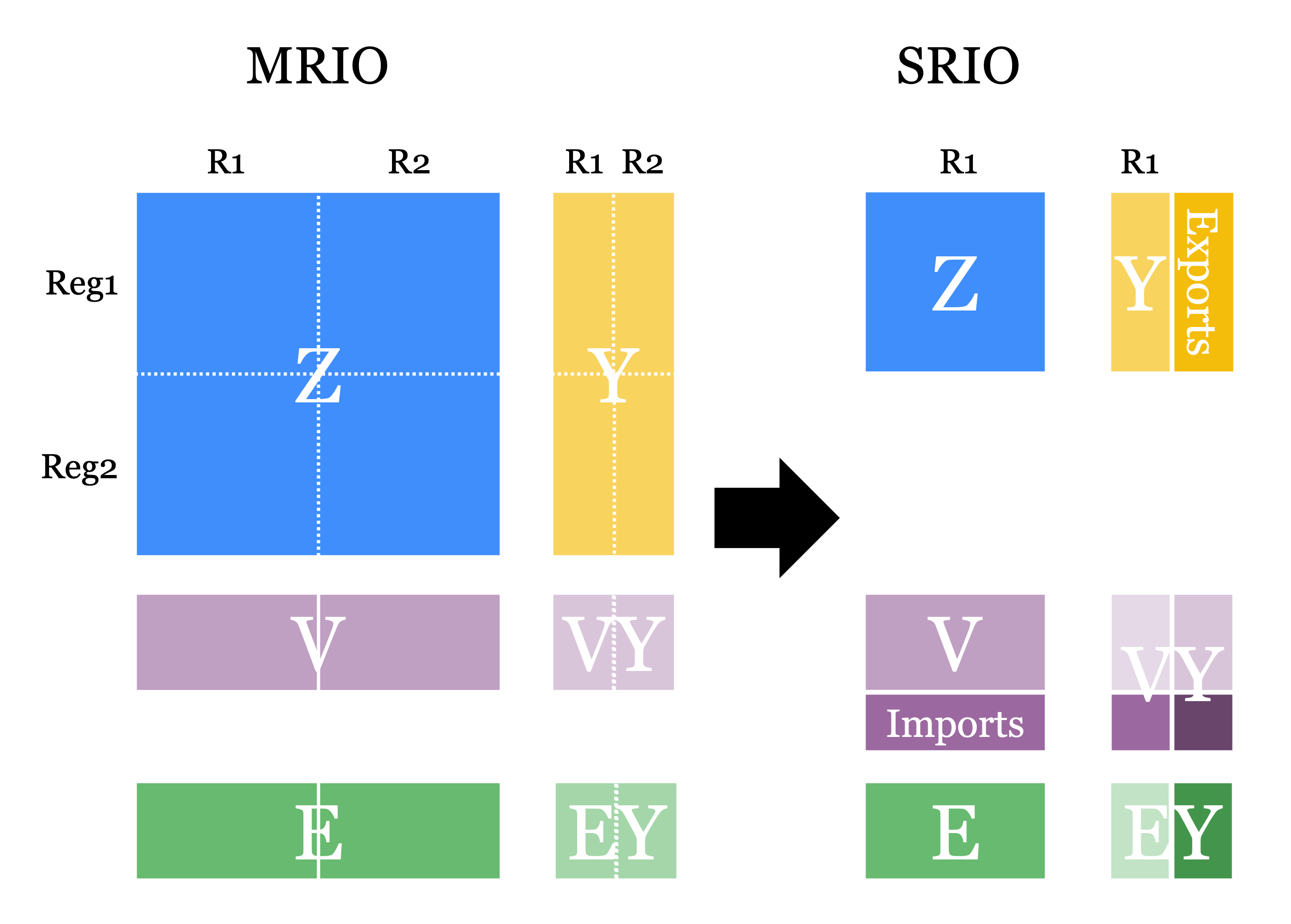
This notebook transforms a Multi-Regional table into a Single-Regional table (MRIO-to-SRIO), working with a test IOT. The logic behind this transformation is represented in the figure below: after selecting the reference region of the SRIO (Reg1 in this case), MARIO will aggregate all imports of such region into a new factor of production and all the exports in a new consumption category.
[1]:
import mario
[2]:
db = mario.load_test("IOT")
INFO Parser: excel reading IOT flows from /Users/lorenzorinaldi/Documents/GitHub/MARIO/mario/test/tables/test_IOT_standard.xlsx.
INFO Parser: state payload ready with 6 canonical blocks.
INFO Parser: excel state ready for IOT.
INFO Metadata: initialized.
Inspect the starting regions#
[3]:
db.regions
[3]:
['Reg1', 'Reg2']
[4]:
db.factors
[4]:
['Taxes', 'Wages', 'Capital']
[5]:
db.consumption_categories
[5]:
['Final demand']
Keep only Reg1#
[6]:
single_region_db = db.to_single_region("Reg1", inplace=False)
single_region_db.regions
WARNING All the scenarios will be deleted to build up the new baseline.
INFO Resolver: resolving X for baseline.
INFO Resolver: trying X via formula build_iot_X_from_Z_Y.
INFO Resolver: resolved X via formula build_iot_X_from_Z_Y.
INFO Transformation: baseline deleted from the database.
INFO Transformation: New baseline added to the database
[6]:
['Reg1']
Keep more than one region#
If you need to keep more than one region explicit, use to_region_subset(...) instead of to_single_region(...). The selected regions remain endogenous with each other, while all the other regions are moved to exogenous imports and exports.
For example, to keep Reg1 and Reg2 explicit:
[ ]:
subset_db = db.to_region_subset(["Reg1", "Reg2"], inplace=False)
subset_db.regions
Inspect the new value-added and final-demand labels#
[7]:
single_region_db.factors
[7]:
['Taxes', 'Wages', 'Capital', 'imports']
[8]:
single_region_db.consumption_categories
[8]:
['Final demand', 'Final Demand exports', 'Intermediate exports']